Last month, a friend in Jaipur came home from a wedding trip to find her balcony grill pried open. Nothing was stolen — her neighbor’s dog scared the guy off — but she spent the next week comparing every home security system on Amazon at 1 AM. Sound familiar?
If you’re trying to figure out the best home security systems for your house or apartment in 2026, you’re not alone. The market’s crowded, half the listings use the same stock photos, and everyone claims to be “AI-powered” now. This guide cuts through that. We’ll go through what actually matters, which systems are worth your money, and where people usually go wrong.
What Makes a Home Security System “Good” in 2026?
A good home security system in 2026 combines real-time mobile alerts, reliable cameras, motion sensors, and a backup power source — so it keeps working even when the internet drops or the power goes out mid-monsoon. Anything less is just a fancy doorbell.
Here’s the thing nobody tells you upfront: the camera is the least important part. Everyone obsesses over camera resolution — 2K, 4K, whatever — but a burglar cuts your Wi-Fi router before he touches your camera. That’s why the systems that actually work combine three layers: detection sensors (door/window contacts, PIR motion sensors), video verification, and a monitoring or alert mechanism that doesn’t depend entirely on your home broadband.
I’ve noticed most first-time buyers do this backwards. They buy a beautiful 4K camera, mount it facing the gate, and call it done. Six months later they discover it never recorded the guy who walked in through the side entrance because there was no sensor there at all.
Top Picks: Best Home Security Systems for Indian Homes
If you want a quick answer: for apartments, go wireless and DIY. For independent houses, add professional monitoring. Below are the ones worth actually considering.
- CP Plus — India’s biggest CCTV player, and for good reason. Their Ezykam series works both as a smart home camera and a traditional IP camera, which is handy if you’re upgrading an old wired setup instead of ripping it out.
- Qubo (by Hero Group) — Built specifically for Indian homes. Comes with AI person-detection, decent night vision, and — this matters — local SD card storage up to 1TB, so you’re not stuck paying a monthly cloud fee forever.
- Godrej Security Solutions — Over 120 years in the game. Less flashy app, more solid hardware. Good if you want video door phones and smart locks from one brand you can actually call for service.
- D3D — Budget wireless alarm kits, DIY installation in under 10 minutes. Not premium, but genuinely useful for renters who can’t drill into walls.
- Bosch Security Systems India — More commercial-leaning, but their intrusion alarms show up in a lot of gated communities and larger independent homes.
- ADT India — If you want proper professional monitoring with a 24/7 response team, this is one of the few options actually offering it locally.
For a global comparison, if you’re reading this from outside India or just curious: <cite index=”4-1″>for 2026, ADT delivers strong installation quality, SimpliSafe leads in burglary protection, and Vivint dominates smart home integration</cite> in the US market. Worth knowing if you’re weighing imported systems against local ones.
DIY vs. Professionally Monitored: Which One Actually Suits You?
DIY systems suit renters and apartment dwellers who want flexibility and no monthly fees. Professionally monitored systems suit independent houses, people who travel often, or anyone who wants a human responding at 3 AM — not just a push notification you might sleep through.
Here’s a scenario. Picture a small business owner in Jaipur who travels for work three weeks a month and leaves his elderly parents at home. A DIY camera app is useless to him if his phone’s on airplane mode over Bangkok. What he actually needs is a monitored system where a call center follows up if an alarm isn’t acknowledged in 60 seconds. That’s not overkill — that’s the whole point.
On the flip side, if you’re renting a 2BHK and just want to know if someone’s at the door, a ₹3,000 wireless camera with a motion alert does the job fine. Don’t let a salesperson upsell you into a ₹40,000 monitored system you don’t need.
Sensors Matter More Than You Think
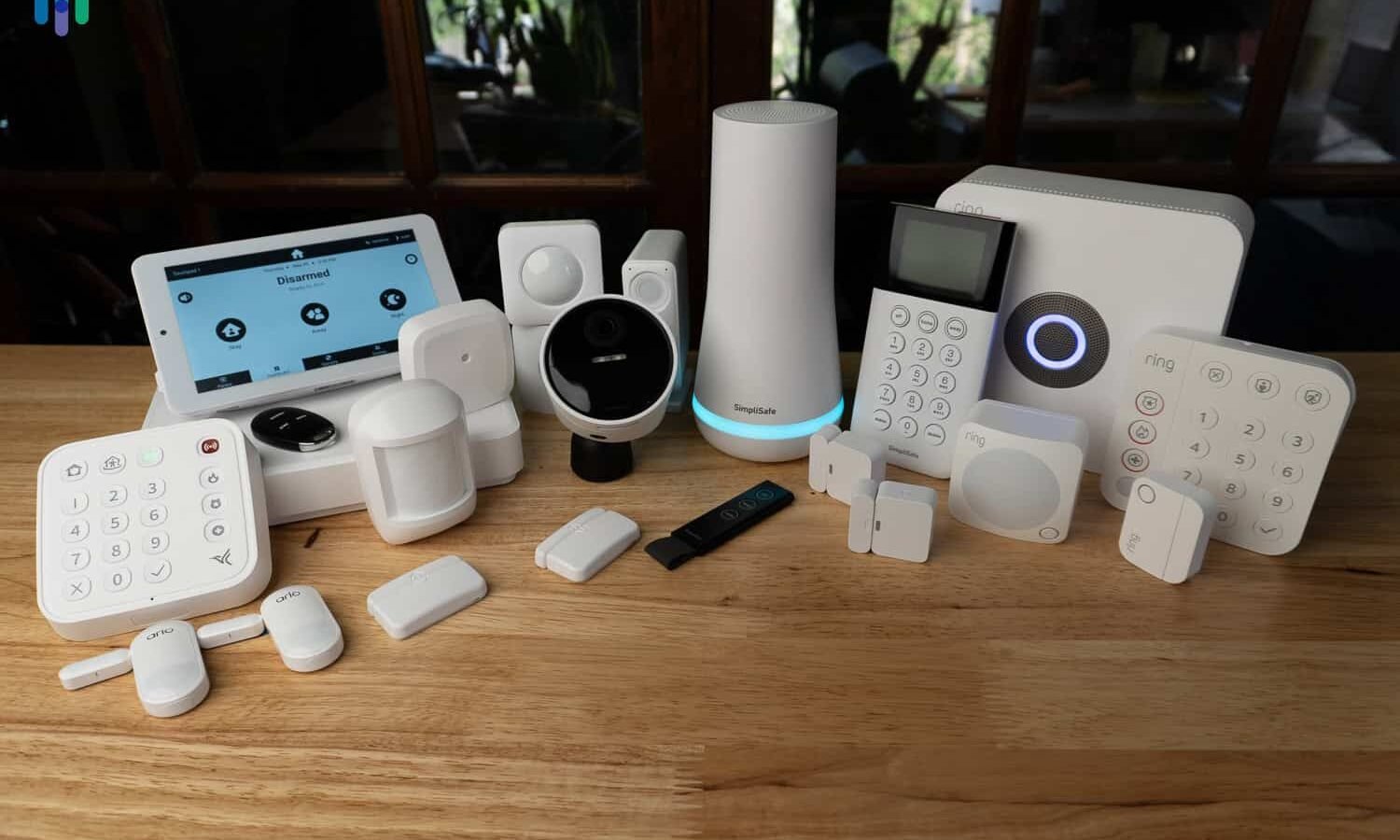
Cameras get all the attention, but sensors are the actual backbone. Door and window contact sensors trigger the instant an entry point opens — before anyone’s even visible on camera. Motion sensors cover rooms cameras can’t reach. Glass-break sensors catch the sound of a window shattering, which a camera pointed the wrong way will completely miss.
Most modern setups use Zigbee-based, battery-powered sensors that work independent of your internet connection. That’s a big deal in India, where a “no signal” day from your ISP shouldn’t mean your house goes unprotected.
One tip: if you have domestic help coming in during the day, look for a system with an actual “Home” arming mode. This keeps your door and window sensors live but switches off interior motion detection, so staff can move around without setting off false alarms every ten minutes. Skip this feature and you’ll disable the whole system out of frustration within a month — I’ve seen it happen.
Power and Connectivity Backup: The Part Everyone Forgets
A reliable home security system needs battery backup and a non-Wi-Fi fallback like a GSM/SIM module, so it keeps functioning during power cuts or when Jio or Airtel has an off day. Skip this and your expensive setup is just a decoration during exactly the hours you need it most.
This is where a lot of cheaper kits fall apart. They look great in the demo video, then the power goes out during a storm and the whole system goes dark along with everything else. Look specifically for:
- A rechargeable backup battery rated for at least 4-6 hours
- GSM/SIM-based alerts as a fallback to Wi-Fi
- Local SD storage in addition to cloud, so footage isn’t lost if your internet’s down when it matters
AI Features Worth Paying For (and Ones That Aren’t)
AI person-detection that tells a human apart from your cat knocking over a plant? Worth it — cuts down false alarms dramatically. Facial recognition that claims to identify “known visitors”? In my experience, mostly gimmicky in real Indian lighting conditions, especially at night or through a grille door.
I’d rather have a system that reliably tells me “person detected at gate, 11:47 PM” than one promising fancy facial ID that fails half the time anyway. Don’t pay a premium for features you’ll switch off within a week out of irritation.
Budgeting for a Home Security System in 2026
Rough numbers, so you’re not going in blind:
- Basic DIY wireless kit (1-2 cameras, door sensor): ₹3,000–₹8,000
- Mid-range setup with app control, AI detection, cloud storage: ₹12,000–₹25,000
- Full monitored system with professional installation and 24/7 response: ₹30,000+ upfront, plus monthly monitoring fees
[link to related guide about smart locks for Indian homes here]
Don’t just look at the upfront price — factor in the cloud storage subscription too. Some brands lure you in with a cheap camera, then the storage plan costs more than the hardware over two years.
Installation: DIY or Hire Someone?
Most wireless home security systems today are designed for DIY setup and can be installed in under 10-15 minutes without drilling or an electrician. Wired CCTV and monitored alarm systems still need a professional, usually a half-day job.
If you’re in a rented flat, DIY wireless is honestly the only sensible choice — you can’t be drilling holes into someone else’s walls. If you own an independent house and want CCTV covering the compound plus the main gate, hire a local installer. It’s not expensive — most CP Plus or Hikvision dealers in Tier 1 and Tier 2 cities will do a full setup for a few thousand rupees on top of hardware cost.
[link to related guide comparing wired vs wireless CCTV here]
Common Mistakes People Make
- Mounting the camera too high — great for avoiding vandalism, terrible for facial clarity
- Relying only on cameras and skipping sensors entirely
- Forgetting to test the alert notifications after setup (a shocking number of systems are “installed” but never actually tested)
- Choosing a system based on brand recognition alone instead of matching it to their actual living situation
- Ignoring the recurring cloud storage cost until the first bill arrives
[link to related guide on false alarm reduction tips here]
FAQs
Which is the best home security system for apartments in India? For apartments, a DIY wireless setup from Qubo or D3D usually works best — no drilling, quick installation, and you can take it with you if you move. Add a door sensor at minimum, even if you skip everything else.
Is a monitored home security system worth the monthly fee? If you travel often or live alone, yes — a monitored system means someone actually calls or dispatches help instead of you missing a push notification while asleep. If you’re home most of the time, a DIY alert system is usually enough.
Do home security cameras work during a power cut? Only if they have a battery backup, which not all budget cameras include. Always check this spec before buying — it’s often buried in the fine print, not the headline features.
How many cameras do I actually need for a 2BHK flat? Two is usually enough — one at the main entrance, one covering the living area. Adding sensors to windows matters more than adding a third camera in most cases.
Can I add a home security system to a rented apartment? Yes, wireless DIY kits are made exactly for this. No drilling, no wiring, and you can uninstall and take it when your lease ends.
Are AI-powered cameras actually better than regular ones? The person-detection feature genuinely helps reduce false alarms from pets or moving curtains. Facial recognition, on the other hand, is hit-or-miss in real Indian home lighting — don’t pay extra just for that.
Conclusion
Picking the best home security system for 2026 isn’t about chasing the flashiest AI camera on the shelf. It’s about matching the setup to how you actually live — apartment or independent house, home most days or traveling often, budget-conscious or willing to pay for round-the-clock monitoring. Get the sensors right, don’t skip the power backup, and skip the gimmicks you’ll disable within a week anyway.
If you’re still unsure where to start, pick one entry point — your main door — and get that properly covered with a sensor and camera combo first. You can always expand from there. Don’t let analysis paralysis leave your home the way my friend’s balcony was: wide open and unprotected.